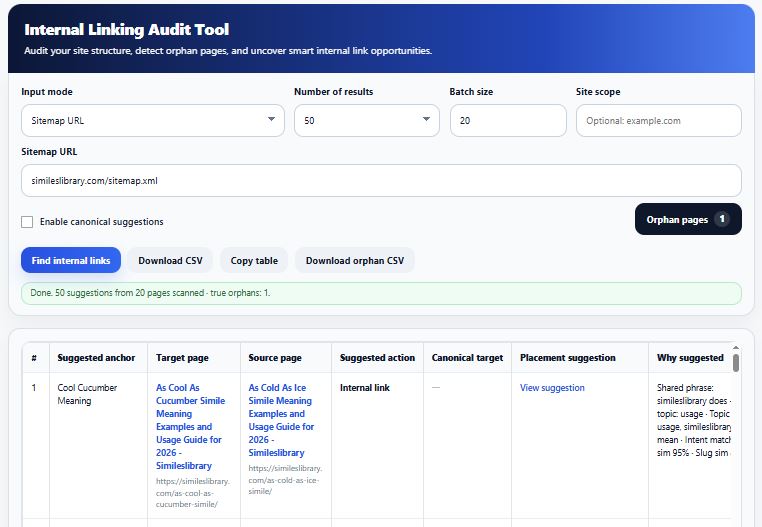
If you want better rankings, better crawling, and a cleaner site structure, internal linking deserves real attention. Many site owners spend time on backlinks, content writing, and technical fixes, yet ignore the links inside their own website. That is where a dedicated tool like InternalLinkAudit.com becomes useful.
An internal link audit tool helps you see how your pages connect, which pages carry authority, which pages stay buried, and which URLs have become invisible to users and search engines. It turns guesswork into a clear process. Instead of manually opening posts one by one, you can review your internal linking structure in a much faster and more organized way.
This article explains internal linking from all angles. It covers what internal linking means in SEO, why orphan pages matter, how to analyze your site, and how a tool like InternalLinkAudit.com can help you improve structure, discover problems, and fix them with more confidence.
What is internal linking in SEO?
Internal linking in SEO means linking one page of your website to another page on the same website. These links help users move through your content and help search engines understand how your pages relate to each other.
Internal links do more than connect pages. They help search engines discover content, understand topic relationships, and identify which pages matter most. A strong internal link structure can support rankings because it distributes authority across your site and gives context through anchor text.
For example, if you have a blog post about keyword clustering and another one about topical authority, linking them together helps both readers and search engines understand that the two topics are related. That is a simple internal linking example, but the effect becomes much stronger when your whole site follows a logical pattern.
Why internal linking matters so much
A lot of SEO problems start with poor site structure. Pages exist, but they are hard to reach. Some pages get too many links, while others get none. Some important pages sit deep inside the site with no support from related content.
Good internal linking helps you:
- improve crawlability
- pass relevance and authority to important pages
- keep visitors engaged longer
- reduce the chance of important pages getting ignored
- support topic clusters and topical authority
- surface old but valuable content
- find and fix weak or isolated pages
This is why an internal linking audit is not just a technical task. It is also a content strategy task and a growth task.
Types of internal linking
Understanding the types of internal linking makes it easier to build a clean site structure.
1. Navigational links
These appear in menus, headers, sidebars, and footers. They help users reach major pages like categories, services, contact pages, and key tools.
2. Contextual links
These links appear inside the main content of a page. They are often the most powerful for SEO because they connect related topics naturally within the text.
3. Breadcrumb links
These show users where they are inside the site hierarchy. They also help search engines understand structure.
4. Related post links
These guide users to similar articles, guides, or tools and can reduce bounce while increasing page discovery.
5. Image or button links
These include clickable banners, cards, buttons, or linked images that move users to related pages.
A strong website usually uses all of these, but contextual links often provide the clearest SEO value because they are based on topic relevance.
Internal linking example in real SEO use
Let’s say you run a site about SEO tools. You publish these pages:
- Internal Linking Audit Guide
- Orphan Pages Explained
- Technical SEO Checklist
- On Page SEO Basics
- Internal Link Checker Tool
A smart structure would connect them naturally. Your guide on internal linking should link to orphan pages, because orphan pages often appear during link audits. Your orphan pages article should link back to the tool page, because readers may want to scan their site. Your technical SEO page should link to internal linking because crawl efficiency and site structure overlap.
That is a practical internal linking example. Each page supports the others. Readers get a better path, and search engines get clearer signals.
What an internal linking checker actually does
An internal linking checker helps you review how pages connect across your site. Instead of scanning content manually, the tool can identify which pages receive internal links, which pages give links, and which pages stay underlinked.
A good checker should help you answer questions like:
- Which pages have zero internal links pointing to them?
- Which important pages are weakly linked?
- Which pages get too many links and which get too few?
- Are related pages connected properly?
- Are there orphan pages on the site?
This makes the tool useful for bloggers, affiliate sites, SaaS sites, ecommerce stores, publishers, and agency teams.
What is internal linking analysis?
Internal linking analysis goes beyond counting links. It looks at whether the structure makes sense.
A page may have ten internal links, but if they all come from unrelated pages, the value is weaker. Another page may have only three links, but if those links come from highly relevant articles with useful anchor text, that page may perform better.
Good analysis looks at:
- number of incoming internal links
- number of outgoing internal links
- relevance of linking pages
- depth from homepage or category pages
- anchor text patterns
- missed linking opportunities
- isolated or hidden pages
This is why an audit tool should not only show data. It should also help users understand what the data means.
Internal linking best practices that actually help
When people talk about internal linking best practices, they often keep it too generic. The real goal is to make your structure useful, logical, and easy to crawl.
Here are the practices that matter most:
Link related pages, not random pages
Only link when there is a real topical connection. Forced linking weakens user experience.
Prioritize important pages
Your money pages, core guides, categories, and high value content should receive strong internal support.
Use natural anchor text
Anchor text should describe the destination page clearly. Keep it readable and relevant.
Avoid burying important pages
A page should not be several clicks deep with no contextual support from related content.
Review old content regularly
Older articles often miss links to newer content. An audit helps you update them.
Keep structure consistent
If you use topic clusters, keep parent and child content connected in a predictable way.
Watch for orphan pages
Even great content can fail if it has no internal path leading to it.
These are the kinds of fixes that can make a site cleaner and stronger over time.
What is orphan pages?
A common question is: what is orphan pages?
An orphan page is a page that exists on your website but has no internal links pointing to it from other pages on your site. It may still exist in your sitemap or be indexed, but users and search engines have a harder time discovering it through normal site navigation.
In simple words, it is a page with no internal connection to the rest of your website.
This is one of the biggest reasons internal audits matter. You may have useful content sitting live on your site, but if no page links to it, its SEO potential stays weak.
Orphan pages in SEO example
Here is an easy orphan pages in SEO example.
You publish a useful blog post called “Best Internal Linking Template for Blog Content.” It goes live, but you never add links to it from related guides, category pages, or older posts. The page exists, but no visitor can naturally reach it while browsing your site. Search engines may eventually find it through your sitemap, but it still lacks structural support.
That page is now an orphan page.
Another orphan pages example is a service page created during a redesign, then removed from navigation by mistake. It still exists, but nothing links to it anymore. It may stay indexed for a while, but performance often suffers because the page sits outside the site’s main link flow.
Why orphan pages hurt SEO
Orphan pages can create several SEO issues:
- search engines may discover them late
- they receive less internal authority
- users rarely reach them
- they often stay outdated because no one sees them
- they break your topic structure
- they weaken your overall site architecture
This is why many site owners search for terms like orphan pages in SEO free, orphan pages checker, and how to find orphan pages in SEO. They know the issue matters, but finding these pages manually is slow and messy.
How to find orphan pages in SEO
If you want to know how to find orphan pages in SEO, the general process looks like this:
- collect a list of site URLs from a sitemap, crawl, CMS export, or database
- compare that list against pages discovered through internal links
- identify pages that exist but are not linked from anywhere else
- review whether those pages should be linked, redirected, merged, or removed
Doing this manually takes time, especially on large sites. That is why using a proper tool is faster and more reliable.
How to find orphan pages in InternalLinkAudit.com
If your site is built around link auditing, one useful angle is teaching users how to find orphan pages in InternalLinkAudit.com.
The process should feel simple:
- enter your website or sitemap
- let the tool scan linked pages and discovered URLs
- compare pages found in structure versus pages that exist in the sitemap or URL list
- review the pages that have no incoming internal links
- export the results and start fixing them
This is where a dedicated orphan pages checker becomes valuable. It saves time, highlights URLs that need attention, and turns a technical problem into an actionable list.
For a tool site like InternalLinkAudit.com, this feature can be one of the biggest selling points because orphan pages are easy to explain and easy for users to act on.
How to fix orphan pages
Knowing how to fix orphan pages is just as important as finding them.
The right fix depends on the page.
Add relevant internal links
If the page is valuable and should stay live, link to it from relevant articles, category pages, or hubs.
Add it to site structure
Important pages may belong in navigation, breadcrumbs, or related content blocks.
Merge overlapping content
If the page is thin or duplicated, combine it with a stronger page and redirect the weaker version.
Redirect outdated pages
If the content no longer serves a purpose, redirect it to the most relevant live page.
Remove low value pages
Some orphan pages do not deserve recovery. If they are outdated, thin, or unnecessary, removal may be the better choice.
The main thing is not to treat every orphan page the same way. Some should be rescued. Some should be cleaned up.
Why an internal linking template helps
An internal linking template gives site owners a repeatable way to add links while publishing content. This matters because many orphan pages appear simply because publishing workflows are inconsistent.
A good template can include:
- main target keyword
- related pages to link from
- related pages to link to
- suggested anchor text ideas
- category or cluster placement
- orphan page status
- priority level
This turns internal linking into a process instead of a last minute thought. For content teams, agencies, and multi author blogs, that can prevent a lot of structure problems before they happen.
What makes InternalLinkAudit.com useful
A site like InternalLinkAudit.com becomes valuable when it helps users do three things clearly:
1. Find internal link weaknesses fast
Users want to see underlinked pages, unbalanced structure, and missed linking opportunities without manual checking.
2. Detect orphan pages
This is one of the most practical SEO tasks because it reveals pages that are getting ignored.
3. Take action
The tool should not just show a problem. It should help users understand what to fix next.
That makes the platform more than an internal linking checker. It becomes a decision making tool for SEO improvement.
Who can benefit from this kind of tool
Internal link audits are useful for almost every kind of website:
- bloggers who publish often and forget to update old posts
- affiliate sites building topical authority
- ecommerce stores with product and category sprawl
- SaaS sites with landing pages and help docs
- agencies managing multiple client sites
- publishers with large content archives
The larger the site gets, the more valuable structured internal linking analysis becomes.
Common mistakes site owners make
Many internal linking problems come from habits like these:
- only linking from new posts and ignoring old ones
- using vague anchor text like “click here”
- linking randomly instead of by topic
- never checking for orphan pages
- relying only on menus and footers
- publishing pages without a linking plan
- forgetting to update site structure after redesigns
This is exactly why regular internal linking audit work should be part of SEO maintenance.
Final thoughts
Internal linking is one of the most controllable parts of SEO. You do not need permission from another site. You do not need a big budget. You just need a clear structure, regular review, and the right tool to reveal what your eyes usually miss.
A good tool site like InternalLinkAudit.com can help website owners understand internal linking in a practical way. It can show how pages connect, where structure breaks down, where orphan pages exist, and what needs fixing first. That makes it useful not only for experts, but also for beginners who want a simple path toward better SEO.
If your site content is strong but rankings still feel inconsistent, the missing piece may not be more articles. It may be better structure. That is where internal linking, orphan page detection, and a proper audit process start making a real difference.